
Have you ever noticed how your back, neck or shoulders start aching after spending several hours at your desk, working on your laptop, watching television or scrolling through your phone?
You are not alone!
In today’s world, sitting has become part of our everyday routine. From office workers and drivers to students, business owners and people working from home, many of us spend a significant portion of the day seated.
But here is something worth thinking about:
It is not just how long you sit that matters. It is also how you sit, how often you move and how well your body is supported.
In musculoskeletal healthcare, posture and movement are important considerations when assessing and managing recurring neck pain, back pain and muscular discomfort.
Over time, poor workstation habits, prolonged static positions and inadequate movement breaks may contribute to discomfort and reduced physical function.
Let’s look at how we can sit better at work and at home. 👇
🧍♂️ 1. Understand What Good Sitting Posture Looks Like
One thing that stands out when discussing posture with patients is how many people believe that sitting upright means keeping the back extremely straight and stiff throughout the day.
That is not necessarily the goal.
Good sitting posture is about maintaining a comfortable, supported position that allows your muscles and joints to function without unnecessary strain.
When sitting:
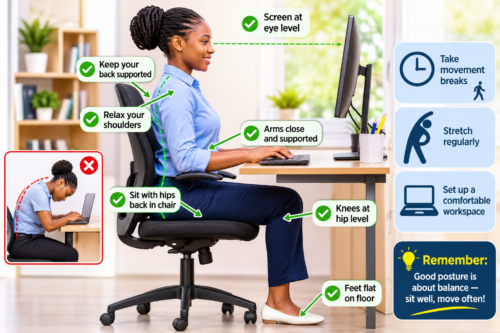
✅ Keep your feet flat on the floor or on a footrest.
✅ Keep your knees approximately level with your hips or slightly lower.
✅ Allow your lower back to maintain its natural inward curve.
✅ Keep your shoulders relaxed rather than raised or rounded forward.
✅ Position your head comfortably over your shoulders.
✅ Keep your elbows close to your body, ideally around a 90-degree angle.
Remember, there is no single perfect posture that you must maintain all day. Comfort, support and regular movement are equally important.
💻 2. Set Up Your Office Workstation Correctly
Your workstation can either support your body or contribute to unnecessary physical strain.
Many people spend hours working on computers without considering how their desks, chairs and screens are positioned.
Here are some practical adjustments:
Monitor position:
- Position your computer screen directly in front of you.
- Keep the top of the screen around eye level or slightly below.
- Maintain a comfortable viewing distance, usually about an arm’s length.
Chair position:
- Choose a chair that supports your lower back.
- Adjust the height so your feet rest comfortably on the floor.
- Avoid sitting at the edge of your chair for prolonged periods.
Keyboard and mouse:
- Keep them close enough to avoid repeatedly reaching forward.
- Keep your wrists relatively straight.
- Relax your shoulders while typing.
If you use a laptop for extended periods, consider a separate keyboard and mouse together with a laptop stand or external monitor.
Small changes in workstation arrangement can make a meaningful difference to daily comfort.
🏠 3. Do Not Forget Your Sitting Posture at Home
Interestingly, people are often more conscious of their posture at work than they are at home.
After a long working day, it is tempting to sink into the sofa, sit with one leg tucked underneath the body or lie awkwardly while watching television.
Although these positions may feel comfortable temporarily, maintaining them for prolonged periods can contribute to stiffness and discomfort.
At home:
- Choose a sofa or chair that provides adequate support.
- Avoid spending long periods sitting with your head bent forward over your phone.
- When watching television, position the screen at a comfortable viewing height.
- Avoid consistently sitting with your legs crossed or tucked underneath you if this causes discomfort.
- Change your position regularly.
And remember, working from home does not mean your body needs less attention!
Your home workstation deserves the same consideration as your office workstation.
📱 4. Be Mindful of Your Neck Position
One common habit that deserves attention is looking down at mobile phones and laptops for extended periods.
When the head moves forward and remains tilted downward, the neck and upper back muscles may experience increased demands.
This can contribute to:
- Neck stiffness.
- Shoulder tension.
- Upper back discomfort.
- Headaches associated with neck dysfunction.
- Reduced neck mobility.
Try bringing your phone closer to eye level rather than constantly lowering your head.
When using a laptop, avoid working for hours with your screen positioned too low.
Your neck deserves a break too!
⏰ 5. Take Regular Movement Breaks
This is one of the most important recommendations when discussing prolonged sitting.
Even if you have an ergonomically designed chair and a perfectly arranged workstation, remaining in one position for several hours is not ideal.
The human body is designed to move!
In my experience, one of the simplest habits people can introduce into their daily routines is taking short, regular movement breaks.
Try the following:
🚶 Stand up and walk around for 2–5 minutes every 30–60 minutes.
🙆 Perform gentle shoulder rolls.
🔄 Gently rotate your neck within a comfortable range.
🧍 Stand and stretch your hip flexors.
🚶 Walk around during phone calls whenever possible.
These small activities interrupt prolonged sitting and provide opportunities for your muscles and joints to move.
You do not need an elaborate exercise routine to start moving more throughout your day.
Consistency matters!
🦴 6. Understand the Impact of Prolonged Sitting on Your Musculoskeletal Health
Prolonged sitting may contribute to several musculoskeletal complaints, particularly when combined with poor workstation ergonomics, insufficient physical activity and repetitive positioning.
Some commonly reported problems include:
Lower back pain: Prolonged static sitting may aggravate existing lower back discomfort, particularly when the sitting position is unsupported or uncomfortable.
Neck pain: Forward head positioning and prolonged screen use can increase demands on the cervical and upper back muscles.
Shoulder pain: Poor desk arrangement, reaching for a mouse and rounded shoulder positioning may contribute to muscular tension.
Hip stiffness: Remaining seated for extended periods can make the hips feel stiff, particularly after standing up.
Reduced physical activity: Spending too much time sitting may reduce opportunities for movement, which is important for maintaining general physical health.
It is important to remember that posture alone does not explain every episode of pain. Musculoskeletal discomfort can have several contributing factors, and persistent symptoms deserve proper assessment.
💪 7. Simple Exercises to Counteract Prolonged Sitting
You can incorporate a few gentle movements into your daily routine.
Here are five exercises worth considering:
- Standing back extensions: Stand upright, place your hands on your hips and gently extend your upper body backwards within a comfortable range.
- Shoulder blade squeezes: Gently draw your shoulder blades together, hold for 5 seconds and relax.
- Seated spinal rotations: Sit upright and gently rotate your upper body to either side without forcing the movement.
- Standing hip flexor stretch: Step one foot forward, gently bend the front knee and move your hips forward until you feel a comfortable stretch at the front of the opposite hip.
- Walking: Take a short walk around your office or home to break up prolonged sitting.
Start gently and avoid movements that cause pain.
❤️ 8. When Should You Seek Professional Help?
Occasional stiffness after sitting for long periods may improve with movement and workstation adjustments.
However, recurring or persistent neck pain, lower back pain, shoulder discomfort, numbness, tingling or pain radiating into the arms or legs should not be ignored.
A musculoskeletal assessment can help identify contributing factors, evaluate movement patterns and guide an appropriate management plan.
Chiropractic care and physiotherapy may form part of an individualized approach to managing certain musculoskeletal conditions, alongside exercise, education and lifestyle modifications.
The goal is not simply to relieve discomfort but also to improve mobility, strength, function and long-term physical wellbeing.
🌟 FINAL THOUGHT: YOUR POSTURE IS A DAILY INVESTMENT IN YOUR HEALTH!
We often invest in comfortable office furniture, computers and other workplace equipment, but how often do we invest in the health of our spine and muscles?
The truth is that better sitting habits do not require expensive equipment or complicated routines.
Start with simple changes:
✔ Adjust your chair.
✔ Position your screen correctly.
✔ Support your lower back.
✔ Keep your feet comfortably supported.
✔ Take regular movement breaks.
✔ Stay physically active outside working hours.
Your spine was designed for movement, not hours of uninterrupted sitting!
Let’s make healthier sitting habits part of our everyday lifestyle, both at work and at home.
💬 LET’S TALK!
How many hours do you spend sitting every day?
Do you experience neck pain, back pain or shoulder stiffness after working at your desk?
And what is one thing you have changed about your sitting habits that has made a difference?
Share your experience in the comments. Your insight might help someone else take the first step towards better musculoskeletal health!
Leave a Reply